

Minecraft Marketplace & Minecoins: Do They Carry Between Devices?
You bought a skin pack and a shiny world on your phone, then you sit down at your PC later, sign in, and panic for a second: is all of that gone? Do you have to buy it again? And those leftover Minecoins, are they stuck on the phone forever?
Short version: no, you don't re-buy anything, and your coins aren't trapped. But there's one rule that decides whether your stuff shows up, and a couple of genuine gotchas worth knowing before you spend money. Here's how it actually works.
The Quick Answer
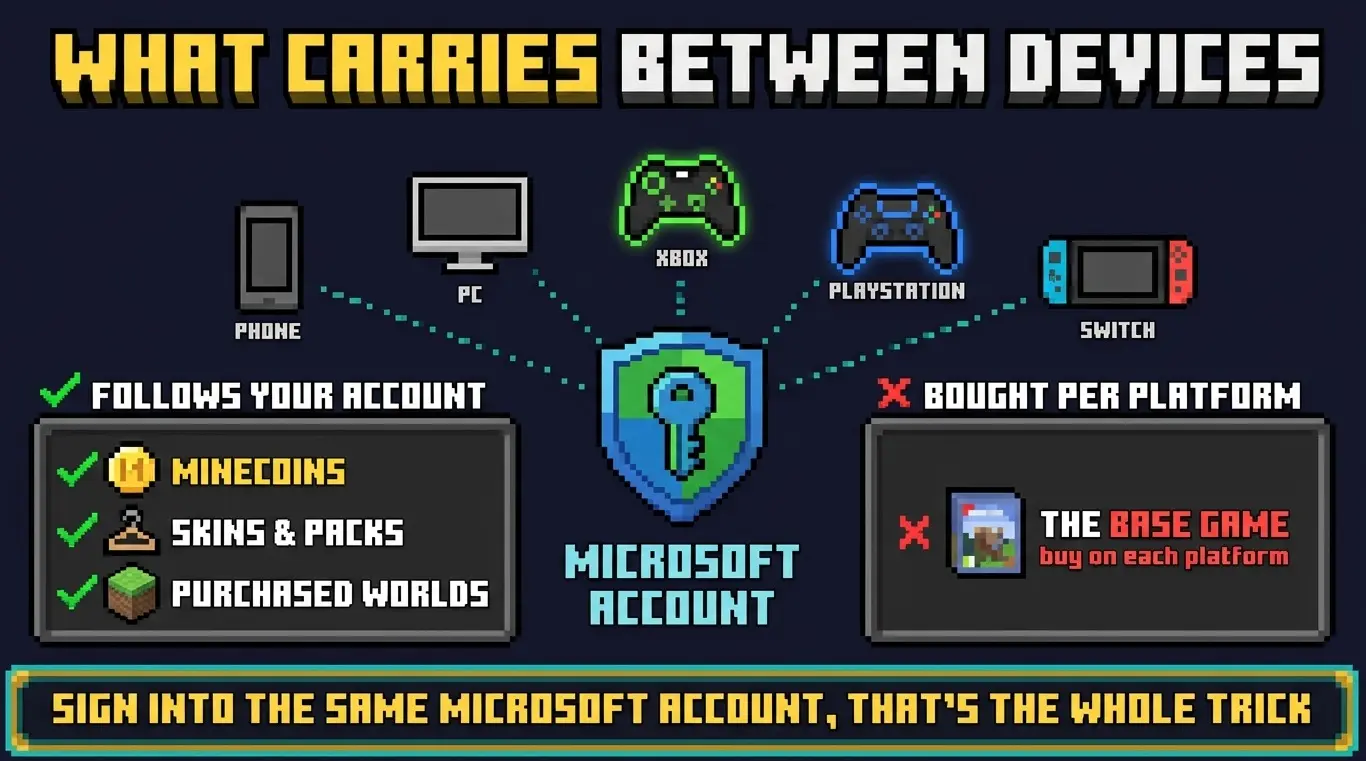
Your Minecoins and everything you buy from the Marketplace are tied to your Microsoft account, not to the device. Sign in with the same Microsoft account on any Bedrock device and your coins and purchased content follow you. The one thing that does not transfer is the base game itself, which is bought separately per platform.
What the Marketplace and Minecoins Even Are
This is worth saying plainly because it's a Bedrock-only thing: the Marketplace is Bedrock's built-in store for skins, texture packs, worlds, and mini-games made by creators. Minecoins are the in-game currency you buy with real money and then spend in that store.
Java Edition has none of this, no Marketplace, no Minecoins. If you're coming from Java guides or friends, that's why the whole system is unfamiliar. It exists only on Bedrock.
How Syncing Actually Works
The whole system hangs on your Microsoft account. When you buy Minecoins or a Marketplace pack, the purchase is recorded against that account. So:
- Buy 1,000 Minecoins on your phone, spend 300 on a skin, then sign into the same account on your PC, your remaining 700 coins and that skin are both there.
- Buy a world on Xbox, load it up later on a tablet signed into the same account, it's available, no second purchase.
- This works across every Bedrock platform: Windows, Xbox, PlayStation, Switch, and mobile, as long as it's the same Microsoft account each time.
The takeaway: it's not your device that owns your purchases, it's your account. Treat signing into the right Microsoft account as the single most important step on any new device. This is the same account system that powers Bedrock crossplay, so if you've already set up playing with friends, you're using it.
The Base Game Doesn't Transfer (The Big Gotcha)
Here's the part that catches people out. Your content follows your account, but the game itself is treated as a separate purchase on each platform.
So if you own Minecraft on your phone and want it on your Xbox too, you buy the Xbox version separately. Owning it on one platform doesn't unlock it on the others. But, and this is the important bit, once you've got the game on the new platform and sign into your Microsoft account, all your Minecoins and Marketplace content are right there waiting. You pay for the game per platform; you do not pay for your skins and worlds again.
About Where You Buy Your Coins
Minecoins you buy become account currency you can spend from any signed-in Bedrock device. That said, you're buying them through whatever store you're on at the time (the App Store, Google Play, the Microsoft Store, or a console store), and that's who processes the payment.
In practice that rarely matters, the coins land in your account and you spend them anywhere. But if coins you paid for don't show up, the store that processed the payment is who you contact about it, not Minecraft directly. Keep that in mind so you know where to turn if a purchase goes sideways.
Moving to a New Device: What to Do
- Install Minecraft Bedrock on the new device (buying that platform's version if needed).
- Sign in with your existing Microsoft account, the same one that holds your coins and purchases. This is the step everything depends on.
- Open the Marketplace and check your coin balance and owned content are showing.
- If something's missing, go to the Marketplace Store and use Restore Purchases, which re-pulls everything tied to your account.
Bedrock vs Java
There's no comparison to draw here, because this is entirely a Bedrock feature. Java Edition has no Marketplace and no Minecoins at all; its customization comes from free community skins, resource packs, and mods installed manually. So if you switch between editions, don't expect your Marketplace purchases to appear in Java, they can't, the system simply isn't there. Everything in this guide applies to Bedrock only.
Troubleshooting
"My purchases/coins aren't showing on the new device." By far the most common cause is being signed into the wrong Microsoft account. Check which account you're logged into, it's easy to accidentally create or use a second one. Then try Restore Purchases in the Marketplace.
"Do I have to buy the game again on my other console?" Yes, the base game is a separate purchase per platform. But your coins and Marketplace content are not, they'll be there once you sign in.
"I bought Minecoins but they never appeared." Contact the store that processed the payment (App Store, Google Play, Microsoft Store, or your console's store), since that's where the transaction lives. Confirm you were signed into the right account when buying.
"My skin/world works on one device but not another." Confirm both devices are on Bedrock (not one on Java) and signed into the same Microsoft account. Marketplace content can't cross into Java Edition.