Copy link
Diamond UI
 Go to files
💎 Diamond UI - Clean & Aesthetic Interface
Upgrade your Minecraft experience with Diamond UI, a sleek and premium interface overhaul. This pack replaces the standard UI elements with high-quality, diamond-themed textures designed for players who love a clean and professional look.
🛠️ Key Features
- Custom Armor Icons: Replaces the default armor bar with uniquely designed Diamond icons for both full and half-armor status.
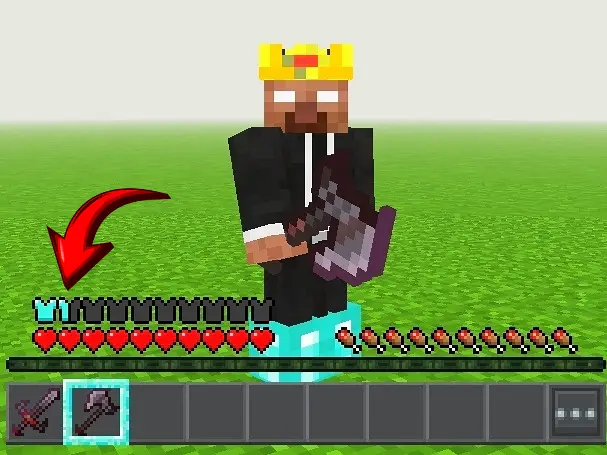
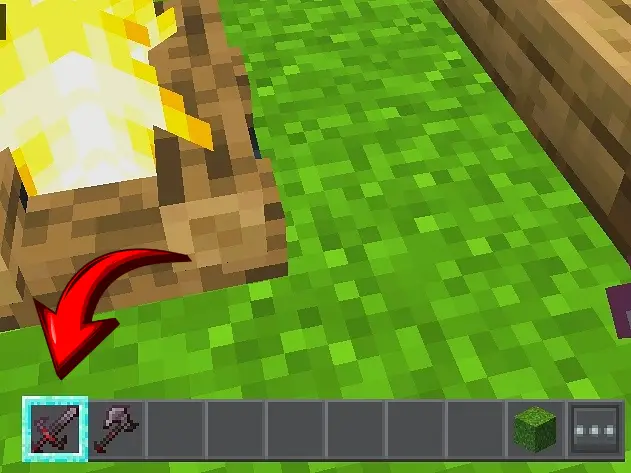
- Diamond Hotbar Selector: A custom selected hotbar that gives your item selection a glowing diamond highlight.
- FPS Friendly: Optimized textures that provide a fresh look without causing any lag or frame drops.
- Latest Version Support: Fully compatible with Minecraft Bedrock Edition (including 1.21+).
📥 Installation Guide
- Download the Diamond UI.mcpack file.
- Open the file to automatically import it into Minecraft.
- Go to Settings > Global Resources.
- Activate Diamond UI and restart your game or wait for the resources to load.
Download links
Supported versions
Tags