zorrocraft

upd:
Copy link
Perfect Land Claim [Achievement friendly]
![Thumbnail: Perfect Land Claim [Achievement friendly]](/uploads/posts/2025-10/3eba258f01_perfect-land-claim-cover.webp) Go to files
Go to files
Protect your base with a 100x100 block area! 🧱 Place the Land Claim Block at the center of your area to protect builds and items. ➕🏞️ Created by ZorroCraft.
Use Gamemode "Creative" to manage claim block
Check this video
(For more clear info)
⚠️ Important: Use Creative for Operator Access 🔓👑
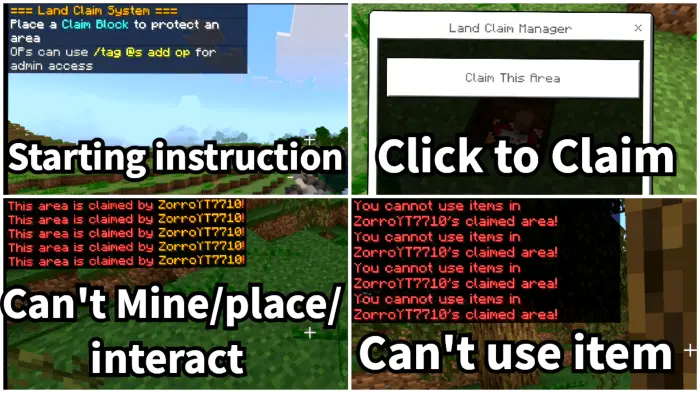
Follow these steps to place and activate a claim block:
- Get a Land Claim Block when you join 🌍
- Dig 2 blocks deep and place it in the center 📦
- Click the block ➡️ click Claim ✅
🔐 Player Privacy
Restrictions
Players can't mine, interact with blocks, or use certain custom/vanilla items inside someone else's claim.
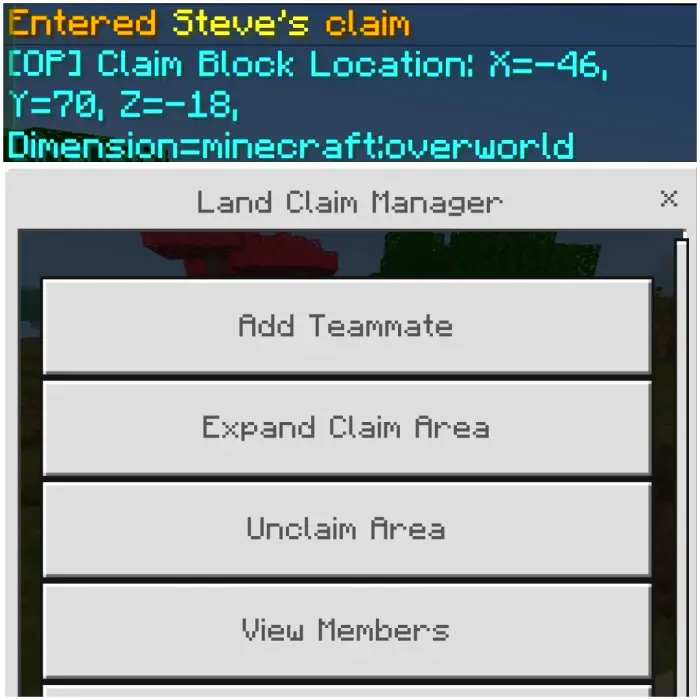
Player claim block location
Only server or Realms operators can view claims and manage them when entering a claimed area (for example, to unclaim or ban a player's claim).
👥 Add Teammates
Add players using their Name Tag 🏷️. Use the list to see added teammates and the owner 👀.
🚫 No Overwrite
Players can’t claim too close to others 🔒🗺️. Claims remain separate and safe 🧩📏.
🗑️ Remove Options
Owners and op-tag players can remove teammates 🧹. Op-tag players can also remove the owner ⚠️👑.
Updated on April 17, 2026
- 🧠 Optimized code structure with added error handling for stability.
- ⚙️ Centralized config system for easier control and management.
- 🎨 Improved UI colors for a cleaner visual experience.
- 📍 Fixed claim boundary detection for accurate protection.
Download links
Tags