
What Light Level Do Mobs Spawn At in Minecraft Bedrock? (It's 0, Not 7)

If you've been lighting your base to "light level 7 or higher" to stop mobs spawning, you're following a rule that stopped being true years ago. It's the single most repeated piece of outdated Minecraft advice, and it's why players still find creepers and zombies spawning in rooms they thought were safe. The real answer changed in the 1.18 update, and it makes spawn-proofing both simpler and a little stricter.
Here's exactly what light level mobs spawn at in Minecraft Bedrock now, how to light up your base so nothing spawns, and how to check light levels on Bedrock (which, annoyingly, is harder than on Java).
Quick Answer: What Light Level Do Mobs Spawn At?
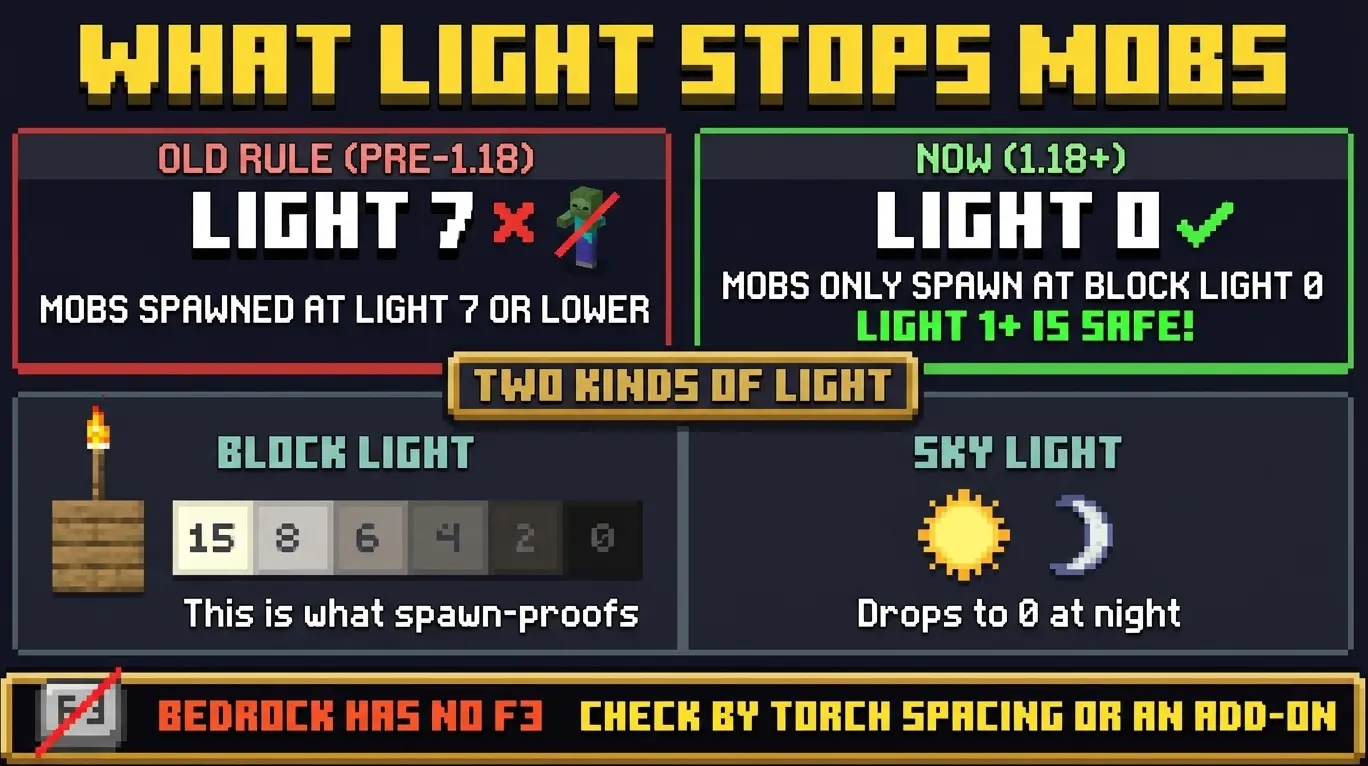
In current versions of Minecraft Bedrock, hostile mobs spawn when the block light level is 0. Not 7, not 3, zero. Since the 1.18 update, any block with a block light level of 1 or higher is safe from hostile mob spawning. To spawn-proof an area, every spawnable surface just needs to reach block light 1.
Why Everyone Still Says "Light Level 7"
Before the 1.18 "Caves & Cliffs" update, the old rule was real: hostile mobs could spawn at any light level of 7 or below, so you had to push light above 7 everywhere. Thousands of guides, videos, and wiki mirrors were written in that era, and most were never updated.
1.18 changed the mob spawning light level to 0. That's a big simplification, because now you don't need bright light everywhere, you just need the tiniest amount of light, a single level, on every block a mob could spawn on. If a guide tells you to keep everything above light 7, it's pre-1.18 and out of date.
Block Light vs Sky Light (The Part That Trips People Up)
Minecraft tracks two separate kinds of light, and the mob spawning rule cares about one of them:
- Block light comes from light sources you place, torches, glowstone, lanterns, froglights, and so on. It's 15 at the source and drops by 1 for each block of distance. This is the one that spawn-proofs.
- Sky light comes from the open sky. It's 15 in daylight but counts as 0 at night, which is exactly why mobs swarm the surface after dark even though it was safe at noon.
For an enclosed build, a cave, a walled base, any roofed area, sky light is already gone, so block light is the only thing keeping mobs out. Get block light to 1 or higher on every floor block and nothing hostile can spawn there. That's the whole job.
How to Stop Mobs Spawning in Your Base
Spawn-proofing comes down to two approaches, and the best builds use both.
1. Add light. Place light sources so every spawnable block reaches at least block light 1. Because a torch's light fades by 1 per block, a single torch keeps a decent radius lit, roughly a dozen blocks of walking distance before it decays to 0. Space torches, lanterns, or glowstone so their pools of light overlap and leave no dark gap. Corners, stairwells, and the edges of large rooms are where mobs slip through.
2. Remove spawnable surfaces. Mobs need a solid, full-block top face to spawn on. Some blocks simply can't be spawned on at any light level, which makes them perfect for spawn-proofing dark areas you can't easily light:
- Bottom-half slabs
- Glass and glass panes
- Carpets (they also block the surface beneath)
- Stairs, fences, walls, and other non-full blocks
Flooring a build in bottom slabs, for example, makes the whole floor unspawnable regardless of light, a popular trick for farms and large platforms.
How to Check Light Level in Minecraft Bedrock
This is where Bedrock players get the short end of the stick. On Java Edition you press F3 to bring up the debug screen and read the exact block light level of the spot you're standing on. Bedrock has no F3 debug screen and no built-in light-level readout at all.
So how do you check light level on Bedrock? You have a few options:
- Eyeball it with torch spacing. For most players this is enough: place light sources so their lit areas visibly overlap and you never see a fully dark block. No dark block means no block-light-0 block, means no spawns.
- Use a light-level add-on. Community add-ons exist that visually mark blocks where hostile mobs can spawn, which is the closest Bedrock gets to Java's F3 for this purpose. Handy for perfecting a big farm.
- Watch for spawns. If mobs keep appearing in a built area, you have at least one block sitting at light 0. Walk the space at night looking for the gap.
Bedrock vs Java
The spawning rule itself is the same on both editions: since 1.18, hostile mobs need block light 0 to spawn, and block light 1+ shuts them out. No difference there, don't let anyone tell you Bedrock uses a different number.
The real difference is checking the light level. Java's F3 screen gives you an exact readout; Bedrock has nothing built in, so you rely on torch spacing, visual judgment, or an add-on. It's the same rule, just harder to measure on Bedrock.
A Few Exceptions Worth Knowing
- Passive animals (cows, sheep, pigs) follow a different rule, they need light level 9+ and spawn on grass. That's about spawning them in, not keeping them out.
- Monster spawners (dungeon spawners) work up to light level 11, so a dark dungeon keeps pumping out mobs until you light it above that or break the spawner.
- Slimes ignore light entirely in slime chunks, and drowned spawn in water under their own rules. Light won't stop either.