Definitive Ore Miner
 Go to files
Have you ever wanted to chop all the flowers in an efficient and fast way? Well, this addon brings you the solution to all your problems with slow and boring mining. Through gametest, I developed a system to chop ores consecutively just by chopping a block. It should also be clarified that this addon is compatible with any other addon since it does not use a player.json.
Installation Guide
You must download the Definitive Ore Miner BP file for the addon's behavior, and then the Definitive Ore Miner RP file for the addon's textures. These two files are required for the addon to work properly.
Update V1.10.6
An option was added to change the durability cost applied to pickaxes when using the Vein Miner feature.

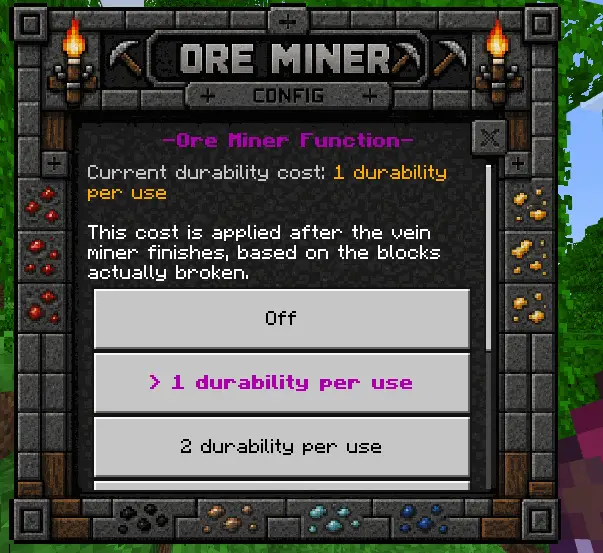
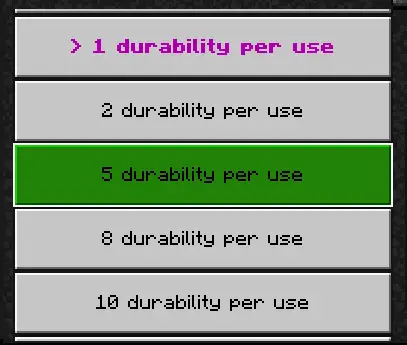
There are several options available so you can configure it to your liking, ranging from 1 to 10 durability points per use.
Update V1.10.5
In this update, a brand-new custom UI has been added for the Configuration Book. We've also introduced several new settings, allowing you to customize the Vein Miner experience in your world much more than before. Below, I'll go over both the new and existing options, explaining what each one does and how it affects the add-on.
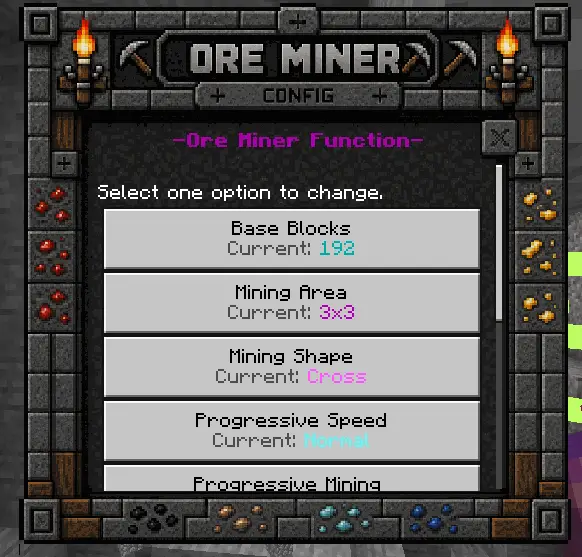
Base Blocks
Sets the maximum number of blocks that can be mined in a single use. The miner will continue following the selected mining pattern until it reaches this limit or there are no more valid blocks to mine.
Mining Area
Changes the size of the mining area around the main direction.
- Line – Mines a single block wide.
- 1x2 – Mines two blocks vertically.
- 2x2 – Mines a 2×2 area.
- 3x3 – Mines a 3×3 area.
- 4x4 – Mines a 4×4 area.
- 5x5 – Mines a 5×5 area.
The selected area also affects the size of geometric mining patterns such as Circle, Triangle, and Cross.
Mining Shape
Changes the pattern used while mining.
- Line – Mines straight forward.
- Stair – Creates a staircase that automatically goes up or down depending on where you start mining.
- Circle – Mines using a circular pattern that moves forward.
- Triangle – Mines using a triangular pattern that moves forward.
- Cross – Mines using a cross-shaped pattern that moves forward.
Progressive Speed
Adjusts how quickly blocks are mined when Progressive Mining is enabled.
- Slow – Breaks blocks more slowly.
- Normal – Balanced speed.
- Fast – Breaks blocks quickly.
- Very Fast – Breaks blocks almost instantly.
Progressive Mining
Instead of breaking every block at once, blocks are mined progressively over time. This creates a smoother animation and can reduce lag when mining large areas.
Enable Only When Sneaking
When enabled, the Ore Miner will only activate while you are sneaking. Disable this option to allow it to work without crouching.
Mining Particle
Enables or disables the particle effects shown while blocks are being mined.
Only Ores
When enabled, the miner will only break ore blocks. When disabled, it can also mine stone and other supported blocks.
Show Actionbar
Shows an action bar displaying the number of blocks mined and the current progress.
Drop Blocks
Controls whether mined blocks drop their normal items.
- ON – Blocks drop their items normally (Fortune and Silk Touch are supported).
- OFF – Blocks are simply removed without dropping anything.
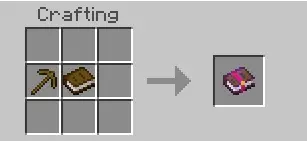
Recipe
If you lose the Configuration Book, you can craft it again using this recipe and easily obtain a new one from the Crafting Table.
Video Review
Update V1.2
In this version 1.2 of the addon, compatibility with the latest versions of Minecraft was added. The code was optimized for better performance, and support for the following enchantments was included:
- Fortune
- Silk Touch
To activate the function, you now need to crouch and mine the block you want. If you mine without crouching, the block will be broken normally.
Experimental Options 👾
- This addon does not need any experimental options to work correctly.
Compatibility ✔️
- You can use it with almost any addon as this addon DOES NOT USE PLAYER.JSON, so it will be compatible with almost any addon, and you can easily put it last if you want.

Function 🔨
I will now proceed to show how spikes work with the ability to spike nearby flowers at once.
Updated on July 28
- Durability Cost per Use was added to the configuration book.
- Added a dependency between the Behavior Pack (BP) and Resource Pack (RP).
- Ensured the addon does not disable achievements.
- Script improvements for better optimization
- Compatible with current version!
- Enchantment bug fixed.
- In this version 1.3 of the addon, compatibility with the latest versions of Minecraft was added. The code was optimized for better performance, and support for the following enchantments was included:
- Fortune
- Silk Touch
- To activate the function, you now need to crouch and mine the block you want. If you mine without crouching, the block will be broken normally.
- Updated to support 1.21.0+ MC version.
- Added compatibility with minecraft bedrock 1.20.50 onwards.
- Errors with the manifest were fixed.