upd:
Copy link

Durability Armor Viewer
Thumbnail: Durability Armor Viewer Go to files


Durability Armor Viewer Addon logo


ALT Instructions for sharing page links


Durability Armor Viewer (DAV)

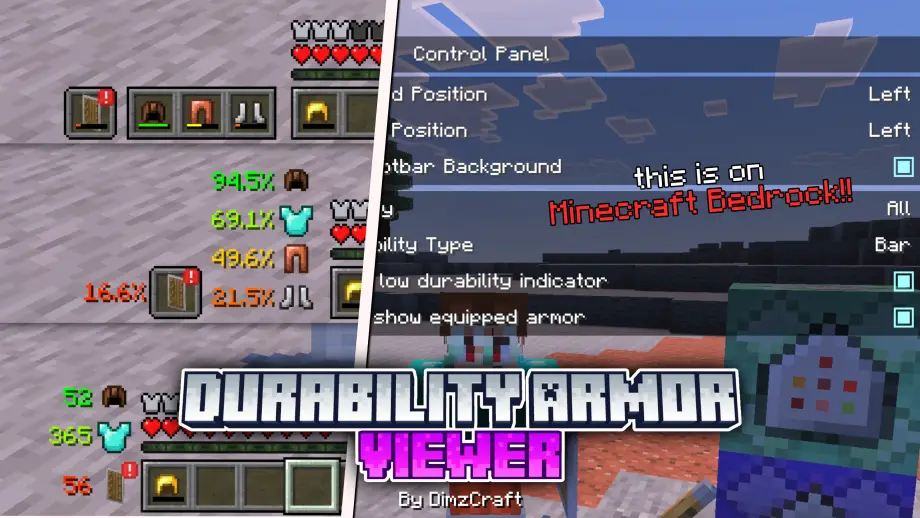
So yeah, this is DAV (I shortened it because the name is too long lol). With this addon, you can see your armor and offhand on the HUD along with other info like durability or stack count. You can also customize it however you like — for example, offhand slot only, or armor only.

Features

  • Displays armor and offhand on the HUD
  • Shows durability and stack count
  • Configurable layout using subpacks (default, beside hotbar, hotbar style, etc.)
  • Achievement friendly

How do you use it?

Install the addon and adjust the layout using the available subpacks. It's simple: choose the layout you prefer (default, beside the hotbar, or hotbar style) and enable it.

Notes

  • This addon uses images instead of a renderer, so there is no enchant glint or armor trim — JSON UI is limited.
  • Does not support custom armor unless it is added manually (see instructions below).

Add custom armor

If you want DAV to display custom armor, follow these steps.

1. Check identifier and texture path

  1. Wear the custom armor in-game.
  2. Type /setting, press the armor button, and write down the identifier.

2. Add identifier and texture path

  1. Open the resource pack folder: dav/ui/dimz_modules/durability_armor_viewer/item_id.json.
  2. Add an entry inside the list, for example:
    "#example:dimz_helmet": "textures/items/example_helmet"
  3. Test it in-game.

If you prefer, you can request compatibility help — contact me on Discord.

Required Dependencies (important!)

Very necessary for the addon to work

UI Neck

Content not viewable in your region

Showcase Video

Watch if you don't understand or want to know how it works!

Join Our Community

Discussions, submit suggestions, report bugs and more

Discord Server | Telegram Group | Whatsapp Group (+62 only)

Reference: control panel | Minecraft Java settings UI, sodium

Download links
DOWNLOAD
Supported versions
1.21.100
Tags
42 096
23 comments
Cancel
  1. No avatar image
    Mc fang7954 Guest
    It won’t let me download the pack u fraud
  2. No avatar image
    Xekreus Guest
    on 1.21.80.3 the green bar durability is not showing on the durabitlity viewer ui, this needs an update fix.
    1. Dimzcraft profile avatar
      Dimzcraft Author
      it's been fixed
  3. No avatar image
    ZeroRacer Guest
    Unfortunately v1.21.80 removed or doesn't show the percentage values for the Beside the Hotbar sub-pack. Letting you know.
  4. No avatar image
    Nitachimc Guest
    Dimzcraft I'm known as nitachimc and I'm here bc I love using ur mods but can I ask for 1.19.80 version of this mod please thank u, if u can't it's okay I just want to use it also for me survival and gameplay horror
  5. No avatar image
    Guest Jester Guest
    Am I able to download it on bedrock edition/on Xbox if so how?
    1. No avatar image
      Guest Guest
      Get a realm and upload it to your realm world through Mobile. You may need to join yourself in a separate world (not in a realm) to download the texture pack into your cache before using it on the realm (that’s what I had to do because on the realm was showing it as unrecognizable texture pack.)

      Ps. You can use your same Microsoft login to join yourself on mobile/xbox
  6. No avatar image
    Nitachimc Guest
    Pls 1.19.80
  7. No avatar image
    Jarzz Guest
    Link download??
  8. could you download it then add the file
    1. Dimzcraft profile avatar
      Dimzcraft Author
      What do you mean?
  9. No avatar image
    Samuel Guest
    What do I do to set "beside the hotbar" as default?
    1. Dimzcraft profile avatar
      Dimzcraft Author
      it's a bit complicated to explain
  10. No avatar image
    ;OIEHF`; OIHEG;Z Guest
    I HAVE TO WAIT AN HOUR TO GET IT
    1. Dimzcraft profile avatar
      Dimzcraft Author
      join discord, there is a file without shortener
  11. No avatar image
    HeroTheMonkey Guest
    DUDE I GOT A GLITCH THAT I HAVE TO WAIT 45 min TO GET THIS
    1. Dimzcraft profile avatar
      Dimzcraft Author
      join discord, there is a file without shortener
  12. No avatar image
    zby Guest
    THERE'S NO WAY TO DOWNLOAD. I use linkvertise and there are too many ads. Have to watch the terrible ads for a few hours. Please use Github or other websites if you are not CRAZY about getting money. 😅😅
    1. Dimzcraft profile avatar
      Dimzcraft Author
      I don't think it's that bad, I've put a video tutorial on downloading, and it only takes less than 15 seconds to download if you just click skip ads
  13. Dimzcraft profile avatar
    Dimzcraft Author
    Note: I see there are some comments, addon bugs on version 1.20.40+, so I think the minimum version is 1.20.70, because I don't know what code changed in the previous version
  14. Storm profile avatar
    Storm
    Hola, excelente complemento, sería genial si muestra también la durabilidad del escudo! Gracias
  15. Does this work with other mods that have armor?
    1. Dimzcraft profile avatar
      Dimzcraft Author
      no, but if you add item id manually it can work, if you need help like that you can chat on discord, I will help :)