Explorer's Title
 Go to files
About Explorer's Title
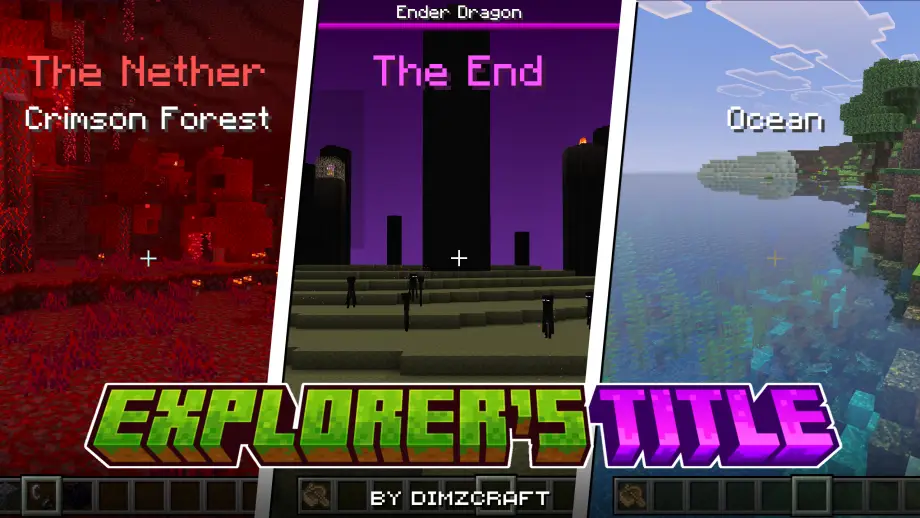
Adds an RPG-style HUD that displays biome and dimension titles when entering new areas, compatible with many biome addons and customizable via .lang files.


If you want your Minecraft gameplay to feel more like an RPG, this addon displays biome and dimension titles directly on your HUD when you enter new areas — simple to install and highly configurable.
How to Use
Install the addon, load a world, and then change dimensions or cross into another biome to see the titles on your HUD. It works out of the box with vanilla biomes and many third-party biome addons.
Compatibility is actively maintained; see the compatibility list below for supported addons.
Customization
You can add or change displayed names via .lang files. To add a biome or dimension, use the biome/dimension identifier. Example identifiers look like minecraft:river — the identifier name part is river.
Use these keys in your .lang file:
dimz-ext.biome.<identifier>=<text>
For dimensions:
dimz-ext.dimension.<identifier>=<text>
Example:
dimz-ext.biome.river=River
More examples are included in the texts folder of the addon.
Compatibility List
- BioScape
- Biome & Beyond
- Wild Expansion
- Seasons biome
- Biomes O' Plenty
- Simple Biome Expansion
Contributors
- chinesezzy_87140
- Azzy YT
- tpsrvnhuutinvietnam0941
- priscilasfantasy
- IsraOrbit
Showcase Video
Watch this if you don't understand or want to see how it works.
Join Our Community
Discussions, suggestions, bug reports and more
Discord Server | Telegram Group | Whatsapp Group(+62 only)
Reference: Traveler's Title Mod