Inventory Organizer
 Go to files
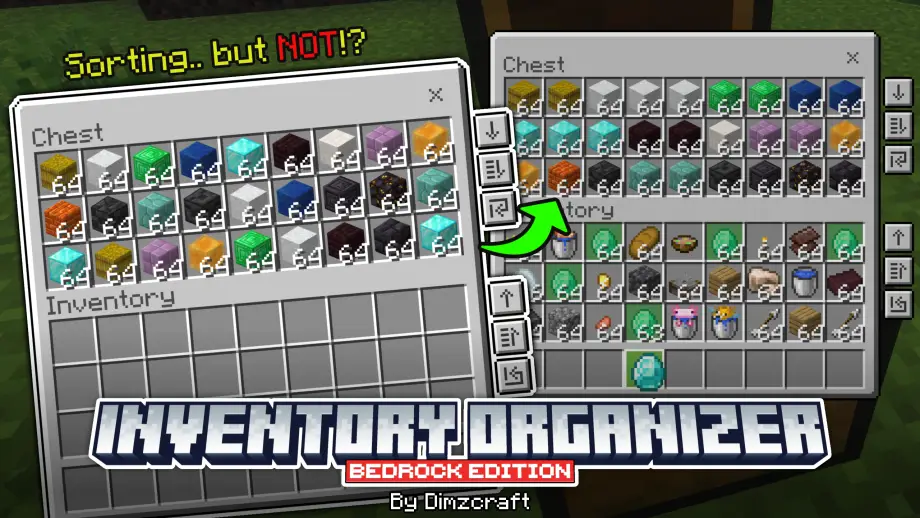
Manage items in your inventory easily! Features include transferring all items, refill, and hm… sorting?

So what does this resource pack actually do?
Well, here’s how it works: when you open a chest, you’ll see some buttons on the right side (check the screenshot). There are two sections: container buttons and inventory buttons. The first button transfers all items. The second button is a dynamic transfer that moves items closest to slot 0 — you could call it a sorter but not really; think of it as a semi-sorter. The third button is for refilling items (for example, press it to refill arrows into a dispenser). If you’re still confused you can check the showcase video below.
Showcase Video
Extra feature
Selected item highlight: when you select an item, all matching item slots will be highlighted in green. Useful if you’re too lazy to search for items.
Note
The buttons and item highlight are available in chests, hoppers, dispensers, and droppers.
Q&A
Does this support other UI packs?
It depends. If another UI pack completely replaces the entire UI, then this resource pack most likely won’t be supported.
Dark mode?
Nope, not yet — planned for a future update.
Known issue
The dynamic transfer button sometimes doesn’t work if you click the same spot while using touch or mouse. Workaround: press Enter if you’re using a keyboard, or click the button then move slightly and click again.
Join Our Community
discussions, submit suggestions, report bugs and more
Discord Server | Telegram Group | Whatsapp Group(+62 only)
Reference: Inventory Management