
Madara Uchiha Animated UI
 Go to files
👑 Madara Uchiha Animated UI Menu (FPS Booster)
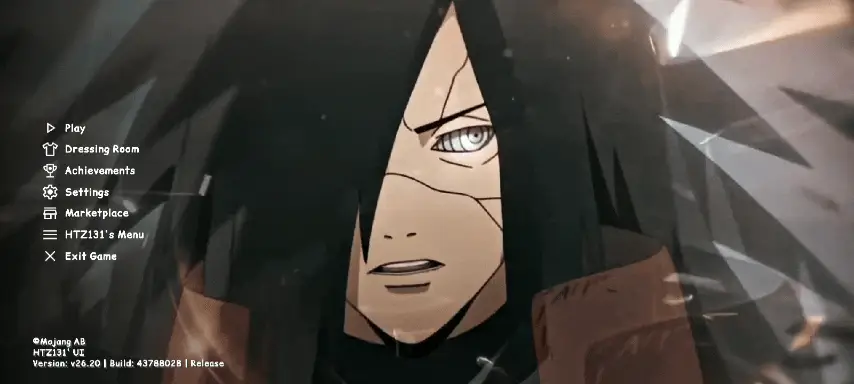
Bring the ultimate power of the Ghost of the Uchiha to your Minecraft Bedrock experience! This complete UI overhaul replaces the boring vanilla menus with a dark, cinematic, and beautifully animated Madara Uchiha theme. It also optimizes game files to boost FPS and clean up world visuals.
🚀 Key Features

🎬 1. Legendary Madara Uchiha Animated Menu Cinematic Screens
The main menu features high-quality animations of Madara Uchiha. Custom interfaces include start screens, settings, and world selection menus fully redesigned with Uchiha aesthetics: dark, sleek, and premium.
⚡ 2. Advanced FPS Booster Engine & Lag Reduction
Laggy vanilla UI elements have been stripped and optimized for maximum performance. Enjoy smoother navigation, zero-delay button clicks, and faster menu loading times. Designed for low-end devices, mobile, consoles, and PCs to improve frame rates.
🌿 3. Clean World Visuals (Full Grass Blocks)
Side textures of grass blocks are replaced with full grass textures—removing the dirt sides for a cleaner look and giving your Bedrock world a seamless, high-end aesthetic.
🛠️ What’s Changed Inside the UI
Brand new start and loading screens showcasing Madara, a redesigned sleek HUD that stays non-intrusive during gameplay, custom buttons and fonts matching the Uchiha theme, and an optimized settings layout to reduce UI stutter.
📲 Installation Guide
- Download the .mcpack file from the provided link.
- Click or tap the .mcpack file to automatically import it into Minecraft Bedrock Edition.
- Open Minecraft, go to Settings > Global Resources, find "Madara Uchiha Animated UI", and press Activate.
- Restart the game so animations and optimizations load properly.
⚠️ Compatibility Notes
Works on Minecraft Bedrock Edition (Android, iOS, Windows 10/11, and Xbox). Render Dragon compatible and optimized for the latest Bedrock rendering engine. Multiplayer safe: usable on servers, Realms, and local worlds.