

Mob Far Scaling [Achievement Friendly]
![Thumbnail: Mob Far Scaling [Achievement Friendly]](/uploads/posts/2026-05/5fb7ba5508_mob-far-scaling-achievement-friendly-cover.webp) Go to files
Go to files
What is Mob Far Scaling?
If you enjoy exploring vast landscapes or digging deep into the caves, you'll love this addon!
The farther you travel from the world's origin (0,0), the stronger mobs become. Every 1,000 blocks you venture out, enemies gain permanent power-ups. The deeper you dig below Y=48, every 12 blocks adds another level of difficulty to the creatures you face.
You'll need to prepare carefully, as mobs deep in the wilderness or far from home will have increased health, strength, and speed. What was once an easy enemy can become a deadly threat the farther you go!
Even monsters added by other addons will gain these scaling effects when spawned far from the world's center!
Key Features
- Dual scaling system - Mobs get stronger based on horizontal distance from (0,0) and vertical depth below Y=48
- Progressive difficulty - Higher levels require exponentially more distance (the stronger the mob, the farther you need to go)
- Progressive XP rewards - Bonus orbs scale with mob level (1 orb per level up to level 10, then progressively slower)
- Three mob categories - Monster, Animal, and Creature, each toggleable independently
- Bilingual interface - Full support for English and Spanish with per-player language persistence
- No cheats required - Works perfectly with achievements enabled
How Scaling Works?
Every time a mob spawns, its level is determined by how far you are from the world's center. The further you go, the higher the level!
| Effect | Max Level | How It Increases |
|---|---|---|
| Health Boost | 252 | Increases every level (faster at low levels, slower at high levels) |
| Strength | 7 | Increases every few levels (gets slower as you progress) |
| Speed | 5 | Increases every few levels (gets slower as you progress) |
| Bonus XP | Progressive | More XP orbs drop as mobs get stronger |
All Commands
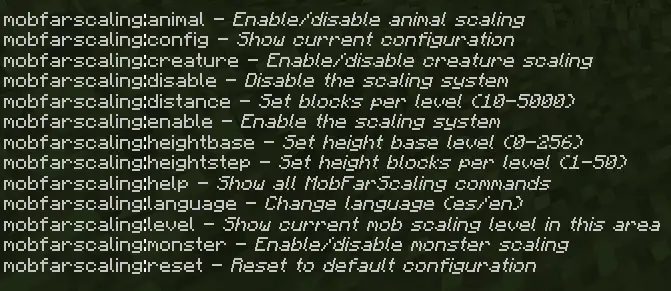
| Command | Permission | Description |
|---|---|---|
/mobfarscaling:help |
Any player | Show all available commands |
/mobfarscaling:config |
Any player | Display current configuration |
/mobfarscaling:level |
Any player | Show current scaling level in your area |
/mobfarscaling:language es/en |
Any player | Change display language |
/mobfarscaling:enable |
Admin only | Activate the scaling system |
/mobfarscaling:disable |
Admin only | Deactivate the scaling system |
/mobfarscaling:reset |
Admin only | Restore default settings |
/mobfarscaling:distance <10-5000> |
Admin only | Set blocks per horizontal level |
/mobfarscaling:heightbase <0-256> |
Admin only | Set Y level where scaling starts |
/mobfarscaling:heightstep <1-50> |
Admin only | Set blocks per vertical level |
/mobfarscaling:monster enable/disable |
Admin only | Toggle monster scaling |
/mobfarscaling:animal enable/disable |
Admin only | Toggle animal scaling |
/mobfarscaling:creature enable/disable |
Admin only | Toggle creature scaling |
Scaling Examples
Horizontal Distance
| Distance (X/Z) | Level | Health Boost | Strength | Speed | Bonus XP |
|---|---|---|---|---|---|
| 1,000 | 1 | 1 | 0 | 0 | 1 |
| 5,000 | 5 | 5 | 0 | 0 | 5 |
| 6,000 | 6 | 6 | 1 | 0 | 6 |
| 10,000 | 10 | 10 | 1 | 0 | 10 |
| 12,000 | 12 | 11 | 2 | 1 | 11 |
Vertical Depth
| Depth (Y) | Level | Health Boost | Strength | Speed |
|---|---|---|---|---|
| 48 | 0 | 0 | 0 | 0 |
| 36 | 1 | 1 | 0 | 0 |
| 24 | 2 | 2 | 0 | 0 |
| 12 | 3 | 3 | 0 | 0 |
| 0 | 4 | 4 | 0 | 0 |
| -12 | 5 | 5 | 0 | 0 |
| -24 | 6 | 6 | 1 | 0 |
| -36 | 7 | 7 | 1 | 0 |
| -48 | 8 | 8 | 1 | 0 |
| -60 | 9 | 9 | 1 | 0 |
Default Configuration
- System Status: Enabled
- Distance Step: 1,000 blocks per level
- Height Base: Y=48 (scaling starts below this)
- Height Step: 12 blocks per level
- Monster Scaling: Enabled
- Animal Scaling: Disabled
- Creature Scaling: Disabled
- Default Language: English
Compatibility
- Works with vanilla Minecraft mobs across all categories
- Fully compatible with monster family mobs from external addons
- Functions without requiring "Allow Cheats" to be enabled
Known bugs
- The config resets when the world closes.