
Mizuha Mimori Swimsuit Girl Animated UI HTZ version
 Go to files
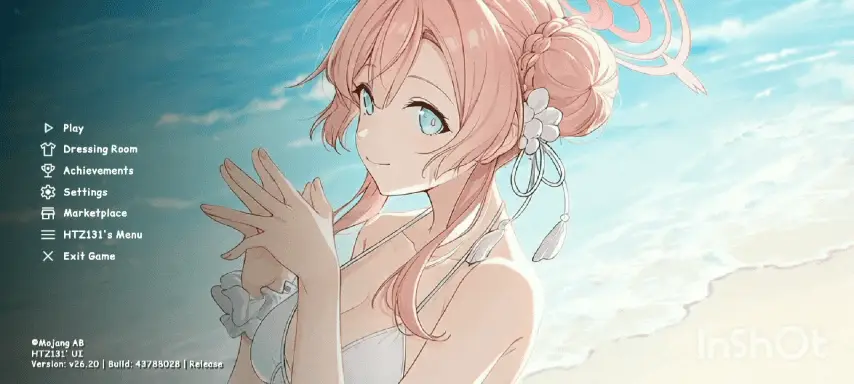
Animated swimsuit-themed UI for Minecraft Bedrock featuring Mizuha Mimori from Blue Archive; HTZ-optimized Live2D backgrounds, beach-themed interface, and custom buttons.
🌊 Mizuha Mimori Swimsuit Girl Animated UI (HTZ Version)
🌊 For Minecraft Bedrock Edition (MCPE)
Bring the refreshing, sunny vibes of the beach straight into your Minecraft menus! This high-quality custom UI resource pack completely redesigns your Bedrock interface, featuring the beautiful Mizuha Mimori (Swimsuit variant) from Blue Archive. Created with the premium HTZ optimization standard, this pack delivers stunning visuals without causing in-game lag.
✨ Key Features

🎬 Fully Animated Live2D Backgrounds
Watch Mimori come to life on your start screen with smooth, seamless breathing and wind animations against a beautiful ocean backdrop.
🏖️ Complete Summer Aesthetic
The traditional, boring dark gray Minecraft screens are replaced with soft, clear beach gradients and beautifully styled transparent panels.
⚡ Ultra-Smooth HTZ Engine Layout
Built using modern Bedrock UI methods to ensure rapid loading times and lag-free screen transitions.
🌸 Custom Themed Elements
- Customized buttons featuring soft accent colors.
- Themed text containers and sliders matching Mimori's iconic design.
- Clean, stylized font alignments for easier readability.
📱 Universal Compatibility
Works seamlessly across iOS, Android, Windows 10/11, and consoles. Tested across multiple screen resolutions.
📸 What's Inside the Menus?
Main Menu Screen
The crown jewel of the pack. Features a wide, high-definition animated frame of Mimori enjoying a sunny beach day.
Settings & Pause Screen
Translucent glass-textured backdrops overlaid with customized side-panels to keep your configurations neatly organized.
World Creation Screen
Bright, summer-themed button panels that make setting up your next survival or creative world more pleasant.
🛠️ Installation Instructions
Download the .mcpack file from the link provided on the post page. Double-click or tap the downloaded file to automatically import it into Minecraft Bedrock Edition. Open Minecraft, go to Settings > Global Resources. Find "Mizuha Mimori Swimsuit Girl Animated UI (HTZ Version)" under your active packs list, click Activate, and move it to the top of your list. Restart the game or allow the loading bar to finish to experience the new interface.
![Thumbnail: Truly Bedrock+ [v1.2.5]](/uploads/posts/2026-04/f3316c45a5_tb-remixed-texture-pack-cover.webp)